Make Your Business Discoverable by AI Assistants
Why Is My Business Not Appearing in ChatGPT? (+ How to Fix It Fast)
Your business doesn’t appear in ChatGPT because AI can’t find trusted, structured, and consistent information about your business online.
ChatGPT pulls recommendations from:
-
Structured data (LocalBusiness schema, FAQ schema, Service schema)
-
Directories (AI-optimized directories, reputable business listings)
-
Your website’s EEAT signals (Expertise, Experience, Authority, Trust)
-
Clear, localized service pages
-
Q&A-formatted content it can easily parse
If AI can’t read, index, or trust your information, it cannot recommend you.
This can be fixed with AEO: Answer Engine Optimization.
Want us to check for you? Get a free AI Visibility Check with LeadGeneratorX or claim your BizzLinkAI listing to start feeding verified data into AI systems.
Show Me If AI Can Find My Business - Please Fill This Form
Understanding AI Visibility
You’re Visible on Google… but Invisible to AI Assistants
Many business owners still rely on old SEO strategies (keywords + backlinks).
But today:
People ask ChatGPT, Google AI Overview, Gemini, and Bing Copilot for direct recommendations like:
-
“Who’s the best electrician near me?”
-
“Suggest a plumber to fix a leaking tap in Brisbane.”
-
“Which accountant should I use in Sydney?”
AI tools don’t show 10 links.
They show 2–3 recommended businesses.
If you’re not one of them:
You’re losing enquiries without even knowing it.

What ChatGPT Looks for When Recommending a Business
What ChatGPT Looks for When Recommending a Business
The Quick 10-Second Test
Try this right now:
Ask ChatGPT:
👉 “Suggest a [your service] in [your suburb].”
If your business doesn’t appear…
AI can’t see you.
That means:
-
Lost leads
-
Lost bookings
-
Competitors winning by default
This is fixable.

Understanding the Process
The 5 building blocks to get listed by ChatGPT
1. Structured Data (LocalBusiness, Service, FAQ Schema)
ChatGPT LOVES structured data.
Schemas tell AI:
-
Who you are
-
What you do
-
Where you are
-
Your services
-
Your reviews
-
Your NAP details (Name, Address, Phone)
If you don’t have schema, ChatGPT is missing the signals it needs to “understand” your business.
2. Q&A Content That Answers Real Queries
ChatGPT prioritizes content that is structured like…
well… ChatGPT.
Meaning:
❌ Paragraph-based, generic SEO fluff won’t rank
✔ Answer-first content (questions + concise answers) WILL
Bots prefer structured, short, fact-based answers.
3. Location + Service Pages
To recommend a business in a specific suburb, ChatGPT needs to confirm:
-
You operate there
-
You offer that service
If you only have a generic home page, AI won’t surface you for local queries.
4. EEAT Signals
EEAT – Expertise, Expertience, Authority & Trust. AI bots check for:
-
Expertise (content depth)
-
Experience (real case studies, photos, credentials)
-
Authority (citations, listings, reviews)
-
Trust (consistent data across the web)
If these signals are weak, ChatGPT won’t recommend you.
5. Consistent NAP Across the Web
If your name, address, and phone differ across listings, AI sees you as inconsistent = not recommendable.
For example, make sure your NAP is consistent all across the internet – from Google Business Profile to directories like BizzLinkAI
Below you’ll find step-by-step implementation guidance, checklists, a 30-day plan, sample JSON-LD templates, and conversion tips.
Building Success with Small Wins
Example case study (how small wins stack)
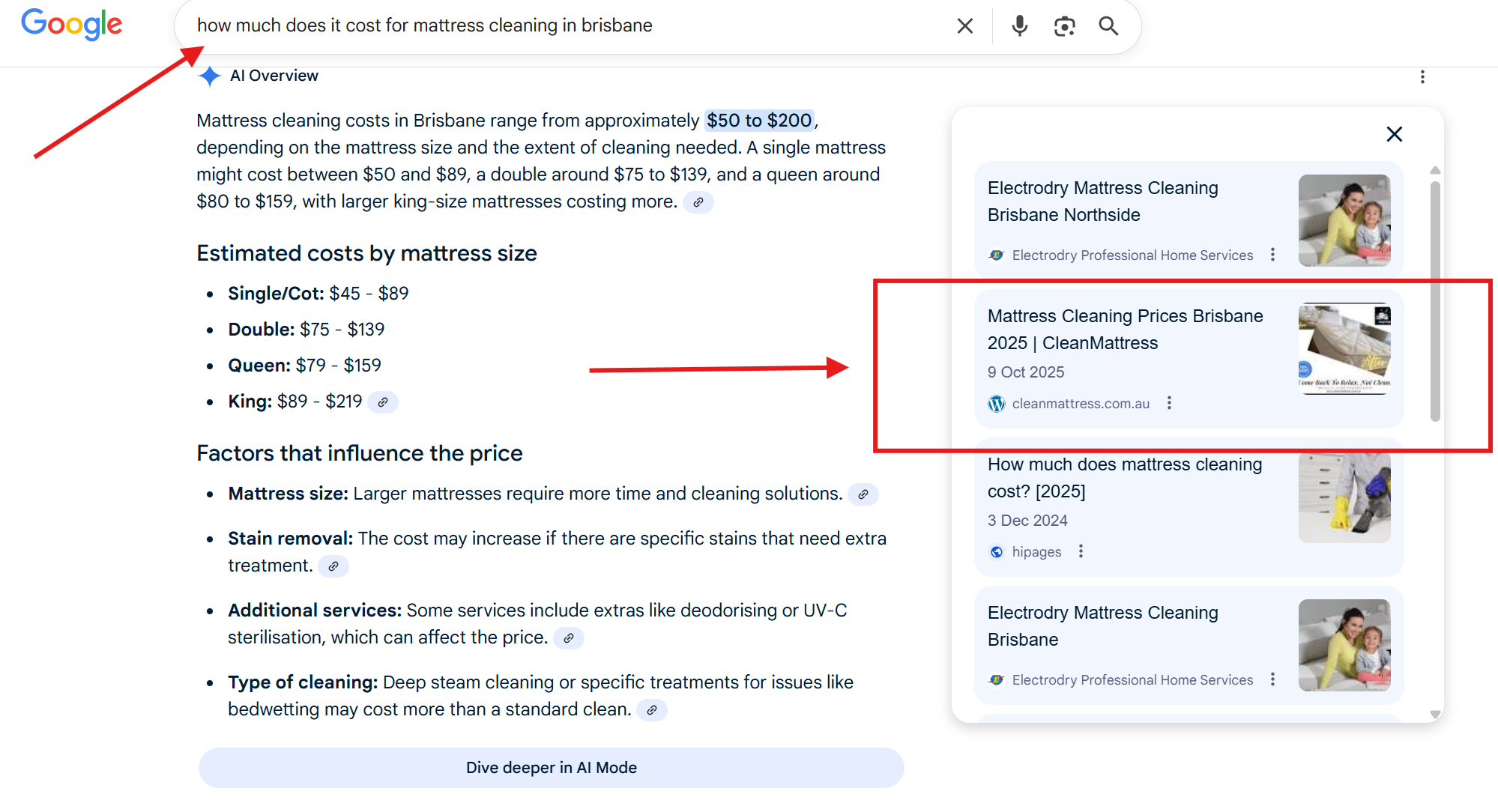
Local Mattress Cleaner “Clean Mattress” published one service page for “Mattress Cleaning Prices Brisbane” with JSON-LD, added 6 recent reviews and got a local news mention about community bed bug and allegen issues.
Within 6 weeks, Clean Mattress began appearing in AI assistants answers like Google AI Overview and ChatGPT for “how much does it cost for mattress cleaning in brisbane”, queries for several Brisbane suburbs and saw a 17% increase in phone leads attributed to AI referrals.
Tick off what you already have in place to see your current AI Visibility Readiness. This checklist is based on the exact process we use at LeadGeneratorX to help local businesses get cited and recommended by AI assistants.
-
1. Add LocalBusiness SchemaGive AI a structured profile of your business so it can understand who you are, where you are, and how to contact you.Must include:
- Name, address & phone (NAP)
- Opening hours & service area
- Geo coordinates
- Logo & website URL
sameAslinks to key profiles (GBP, socials, directories)
-
-
2. Add Service Schema for Each ServiceTurn each core service into a clear “node” AI can read, index, and recommend.
- Create separate pages for each service.
- Mark them up with
@type: ServiceorProductschema.
- Mark them up with
- Describe the audience, benefits and pricing where possible.
-
-
3. Create AEO-Optimised Location PagesHelp AI match you to “service + suburb” searches with specific, location-focused pages.
- One page per key suburb or region.
- Include local references, landmarks or service examples.
- Use FAQ & Q&A sections for common local queries.
- Add FAQ schema where appropriate.
-
-
4. Add Q&A Blocks for Core QuestionsWrite answer-first content in the same format AI assistants use when replying to users.Example questions:
- “How much does carpet cleaning cost in Brisbane?”
- “Do you offer emergency service in <suburb>?”
- “How long does the service take?”
-
-
5. Strengthen Your E-E-A-TShow human users and AI that you’re experienced, authoritative and trustworthy.
- Real photos & behind-the-scenes content
- Case studies & before/after examples
- Certifications, licences & memberships
- Testimonials & Google reviews
- “About the expert” or team profiles
-
-
6. Submit to AI-Friendly DirectoriesFeed clean, structured business data into AI ecosystems via trusted directories.
- List your business in AI-optimised directories and local hubs.
- Ensure data matches your LocalBusiness schema & Google profile.
- Use categories and tags that reflect your real services.
-
-
7. Improve Page Speed & Core Web VitalsFast, stable pages are easier for search engines and AI crawlers to fetch and prioritise.
- Compress and lazy-load images where possible.
- Reduce heavy scripts and unused plugins.
- Monitor LCP, INP and CLS in PageSpeed Insights.
-
-
8. Fix All NAP InconsistenciesMake sure every mention of your business shows the same name, address and phone.
- Align NAP on your website, Google Business Profile & directories.
- Update old addresses or phone numbers on legacy listings.
- Use one standard business name everywhere.
-
Disclaimer: This AEO checklist tool is for demonstration and educational purposes only and does not constitute formal technical or legal advice.
Understanding the Process
Why Your Business Doesn't Appear in ChatGPT: The Common Blockers
Let’s break down the biggest reasons:
1. Your Website Isn’t AI-Readable
AI can’t interpret your content because:
-
No schema
-
No Q&A blocks
-
No clear service areas
-
No entity linking
-
No explicit service descriptions
-
No location-based content
Traditional SEO doesn’t fix this.
2. Your Website Isn’t Trusted Enough
AI bots evaluate trust.
If your EEAT is weak (no reviews, no authority sites linking to you), ChatGPT won’t risk recommending you.
3. You’re Missing from AI-Friendly Directories
AI reads structured directories far more than old-school ones.
If you aren’t in AI-optimized directories like BizzLinkAI, ChatGPT has fewer signals about you.
4. You Don’t Have Specific Location Pages
If the query is:
“Suggest a roof repair company in Logan.”
Your site MUST have a page for:
-
Logan
-
Roof repair
Generic service pages won’t cut it.
5. Your Competitors ARE Doing AEO
If they have:
✔ Schema
✔ Local pages
✔ EEAT
✔ Directory listings
✔ AEO structure
They will outrank you in AI recommendations no matter how good your SEO is.
30-Day GEO Rollout
Audit → Publish → Trust → Off-page
A practical week-by-week plan to make your business discoverable by AI assistants (ChatGPT, Google AI Overviews & more).
Overall Progress
0 of 12 tasks complete
Step 1
Audit: can AI already find you?
Start here. A quick audit tells you whether AI already references your business and where the gaps are.
Do this:
-
Ask ChatGPT and Perplexity (or other AI assistants) for “best [service] in [suburb]” and note whether you’re named.
-
Search your business name + “ChatGPT” in Google.
-
Check your Google Business Profile insights, and any “knowledge panel” your business has.
-
Make a list: where your NAP appears, which directories list you, where schema exists.
If you’re not appearing or citations are inconsistent, fix that first.
Step 2
Build service+location pages that AI will cite
The single most important content unit for GEO is a service+location landing page. AI often cites concise, intent-matching pages.
Page recipe (copy + structure):
-
URL: yoursite.com/service-suburb (clean, canonical)
-
Title / H1: [Service] in [Suburb] — Fast, Insured, Book Online
-
First 30 words (TL;DR): 1 sentence that answers the search intent (who you are, where you serve, call to action).
-
3 Outcome bullets: what the customer gets (speed, guarantee, price transparency).
-
How it works: 3 simple steps.
-
Price range: clear example ranges or starting price (helps conversion).
-
Reviews: 3 recent quotes, with stars.
-
Short FAQ (3–5): target buyer objections.
-
Primary CTA: Book / Free consultation / Free AI Visibility Check.
Copy tip: keep each page focused—don’t stuff multiple services into one page.
Step 3
Add JSON-LD schema (the machine-readable truth)
Structured data is how machines read your page as fact. Key schemas for local businesses:
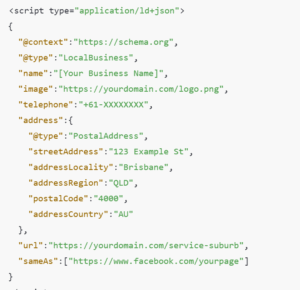
LocalBusiness(or more specific subtypes likeHomeAndConstructionBusiness)Service(to list the service offered)FAQPage(for FAQs)AggregateRating(if you have legitimate reviews)BreadcrumbList(for better snippet display)
Sample LocalBusiness JSON-LD (replace placeholders):
Step 4
Lock down NAP & directory signals (consistency = trust)
AI systems and knowledge graphs link the same business across multiple sources. Inconsistent Name / Address / Phone is a major cause of non-visibility.
Action list:
-
Use the exact same business name string everywhere (no abbreviations unless consistent).
-
Update Google Business Profile, Facebook, Bing Places, BizzLinkAI, Yellow Pages, local chamber, and industry directories.
-
Avoid multiple active listings for the exact same address—merge duplicates.
-
On your website footer, put the same NAP as in your Google Business Profile.
Pro tip: claim and optimize your BizzLinkAI listing—it’s designed to feed AI systems with verified local data.
Step 5
Reviews & Trust Signals (social proof machines read)
AI prefers businesses with verifiable reputation signals. Collect real reviews and mark them up.
Tactics:
-
Ask recent customers for reviews (SMS or email link). Don’t fake or incentivize.
-
Add schema for your best reviews on service pages (
AggregateRating+ individualReviewobjects). -
Showcase local awards, licences, insurance details (images + short structured text).
-
Publish a short case study or “Before & After” with measured outcomes.
Note: models and directories may devalue suspicious review patterns—focus on steady, authentic review growth.
Step 6
Off-page credibility: press, citations & contextual backlinks
A single authoritative local article or chamber mention often carries more weight than dozens of low-quality backlinks.
Where to aim:
-
Local news websites and community blogs (press release about a real local event or case study).
-
Industry partners and vendors (guest posts or partner pages).
-
Chamber of commerce, trade association directories.
-
BizzLinkAI and similar curated directories.
The goal is contextual mentions—your business name in a useful sentence on a credible site.
Step 7
Convert: pages built to close (BOFU UX) Bottom Of Sales Funnel
When AI recommends you, the user should convert quickly.
Checklist:
-
Above-the-fold click-to-call (visible on mobile).
-
Primary CTA: “Free AI Visibility Check” or “Book a Free Consultation”.
-
Short 4-field lead form + calendar or call routing.
-
One clear guarantee: “Satisfaction or re-clean within X days.”
-
UTM tracking on CTAs to attribute leads back to blog/AI sources.
Measuring success — what to track

Understanding the metrics that matter is crucial for gauging the effectiveness of our strategies. By focusing on these key performance indicators, we can ensure continuous improvement and success.
- AI Visibility Checks 95%
- Lead Source Attribution 85%
- Conversion Rate Optimization 75%
AI appearances: re-run AI visibility checks and track mentions.
Lead source attribution: UTM + first-touch tracking for AI/organic sources.
Conversion rate: landing page form → booked job.
Review velocity: new reviews per month.
Authoritative mentions: count of local press and partner mentions.
Common mistakes & how to avoid them
-
Thin, duplicated pages: Don’t mass-generate identical pages for dozens of suburbs—each page must be unique and useful.
-
Fake reviews or review farms: These get devalued and can harm long-term trust.
-
Ignoring schema: Machine signals matter—don’t skip JSON-LD.
-
Poor mobile experience: AI-driven visitors are often mobile-first—make calls and booking frictionless.
FAQ – AI Visibility & ChatGPT Recommendations
1. Why isn’t my business appearing in ChatGPT?
ChatGPT can’t find or trust your business data due to missing schema, weak EEAT, no location pages, or inconsistent online listings.
2. How does ChatGPT decide which businesses to recommend?
It relies on structured data, trusted directories, service pages, Q&A content, and overall authority signals across the web.
3. Is there a way to “list” my business on ChatGPT?
No manual listing exists. You must optimise your website with AEO, schema, citations, and AI-friendly directories.
4. What is AEO and why is it important?
AEO (Answer Engine Optimization) helps AI assistants understand, index, and recommend your business in answer-style search results.
5. Does traditional SEO help with AI visibility?
Only partially. SEO helps ranking in Google, but AEO is required for AI tools like ChatGPT and Google AI Overview.
6. Why do my competitors appear in ChatGPT but I don’t?
They likely have stronger schema, better structured content, more citations, clearer service pages, and consistent NAP details.
7. How long does it take to appear in AI recommendations?
Most businesses see improvements within 2–6 weeks after implementing AEO, schema, and structured content updates.
8. Do I need new content for AI visibility?
You need answer-first content: clear Q&A blocks, location-specific pages, service schema, FAQs, and consistent business data.
9. How can I check if AI can find my business?
Ask ChatGPT: “Suggest a [service] in [location].”
If you’re not listed, your AI visibility is low and needs AEO improvements.
Final Word: AI Can’t Recommend What It Can’t Find
If you’re relying only on traditional SEO, you’re already behind.
AI-driven search is here, and businesses who adapt first will dominate the next decade of visibility.
Start with a FREE AI Visibility Check and a 20-minute strategy session to map your fastest path to AI recommendations.
👉 Request your free AI Visibility Check with LeadGeneratorX — or claim a free BizzLinkAI listing to feed verified data into the systems AI uses.